Samsung Display Familie

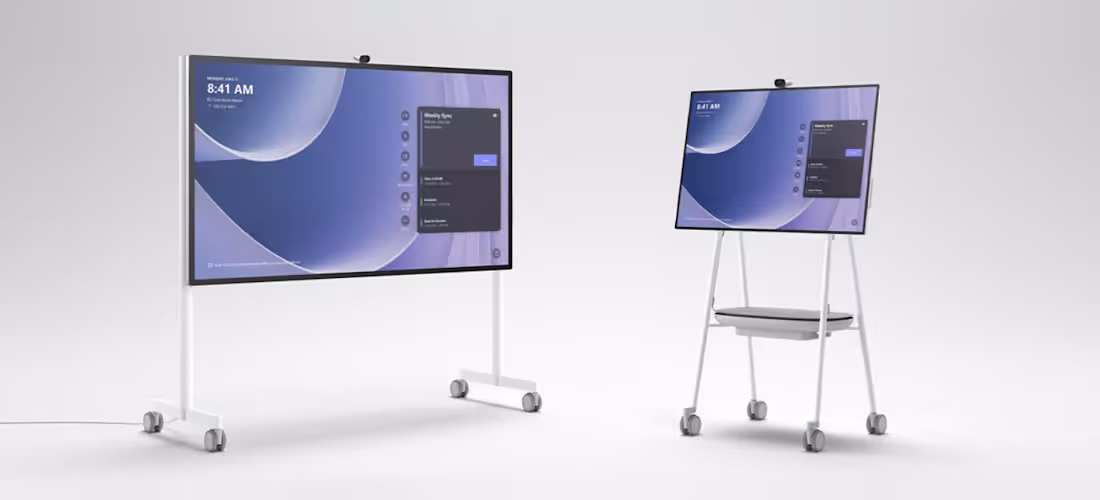
Microsoft Surface Hub 3

The Microsoft Surface Hub 3 is an innovative solution for hybrid teams that enables seamless integration into the modern workplace. With flexible, modular accessory options, it adapts perfectly to spatial and technical requirements. Portrait mode with intelligent rotation ensures optimal orientation during meetings and teamwork. Overall, the Surface Hub 3 provides an efficient platform for collaborative work.

Overview of Microsoft Surface Hub 3

Surface Hub 50 inch
Surface Hub 85 inch

Surface Hub 50 inch

Surface Hub 85 inch

Dimensions:
741mm x 1097mm x 76mm
Dimensions:
1130mm x 1959mm x 85.6mm
Resolution:
3840 x 2560
Resolution:
3840 x 2160
Display:
PixelSense™ display
3:2 aspect ratio
8-bit colors
15.5 mm edge
Glare-free
IPS LCD
Display:
PixelSense™ display
16:9 aspect ratio
8-bit colors
30.5 mm border width
Glare-free
IPS LCD
Chart:
iGPU
Chart:
iGPU
Sensors:
Doppler presence sensor
accelerometer
gyroscope
Sensors:
2 Doppler presence sensor
Wireless connections:
WLAN 5 (compatible with IEEE 802.11 a/b/g/n/ac)
Bluetooth® wireless 5.1 technology
Gigabit Ethernet
Microsoft Teams Cast
Wireless connections:
WLAN 5 (compatible with IEEE 802.11 a/b/g/n/ac)
Bluetooth® wireless 5.1 technology
Gigabit Ethernet
Microsoft Teams Cast
Interfaces:
4 USB-C with two camera ports
1 USB-A port
RJ45 Gigabit Ethernet
mini DisplayPort™ video output
HDMI video input
USB-C with alternate mode DisplayPort input
Interfaces:
3 USB-C port
1 USB-A port
RJ45 Gigabit Ethernet
mini DisplayPort™ video output
HDMI video input
USB-C with alternate mode DisplayPort input
Get a personal offer

Microsoft Surface Hub 3S 50/85 inch

Surface Hub 3 provides a world-class platform for meetings that is certified for Microsoft Teams. With just one touch, users can seamlessly join a Microsoft Teams meeting, regardless of whether it's the 50-inch or 85-inch model. The interaction is optimally tailored to the respective screen size.
Microsoft Surface Hub 2S application

Key features of the Microsoft Surface Hub 3 50/85 inch at a glance

  • The Surface Hub 3 has a special portrait mode that allows professional use in meetings and team activities.
  • Teams can work together on projects, share ideas, and collaborate effectively, regardless of their physical location.
  • Surface Hub 3 is based on Windows and offers advanced enterprise-grade security so that your data is reliably protected.
Get a personal offer

Accessories

Mobile holder for Microsoft Hub S2 85 inch Details

Mobile mount for Microsoft Hub 3 85 inch

  • Dimensions: 191.3 cm x 196.1 cm x 73.9 cm
  • Protected locking system makes it easy to install and adjust the device.
  • Easy to clean thanks to minimalistic design
Mobile holder for Microsoft Hub S2 50 inch Details

Mobile mount for Microsoft Hub 3 50 inch

  • Dimensions: 77.2 cm x 166.1 cm x 67.3 cm
  • Integrated storage compartment to ensure easy storage of cables and other important items during transportation.
  • The storage compartment is made of water-repellent material to protect against dirt and water.
Ground-based wall mount for Microsoft Hub S2 85 inch Details

Microsoft Hub 3 85" Floor-based Wall Mount

  • Dimensions: 191.3 cm x 196.1 cm x 8.4 cm
  • Leveling glides on the legs make it easy to adjust all floor surfaces.
  • Mounting brackets allow individual adjustment of the bracket to the wall.
Wall mount for Microsoft Hub S2 50 inch Details

Wall mount for Microsoft Hub 3 50 inch

  • Dimensions: 56.4 cm diameter
  • Seismic locking system allows the device to lock in automatically
  • Sophisticated system allows easy leveling to achieve the fine-tuning you want.
Wall mount for Microsoft Hub S2 85 inch Details

wall mount for 85 inch Microsoft Hub S2

  • Dimensions: 76.5 cm x 130.8 cm x 3.6 cm
  • Seismic locking system allows the device to lock in automatically
  • Sophisticated system allows easy leveling to achieve the fine-tuning you want.
APC™ Smart-UPS mobile battery details

APC™ Smart-UPS mobile battery

  • 2 hours of power during typical Microsoft Surface Hub 3 use, from the moment you unplug it.
  • It only takes 90 minutes for the battery to be fully charged again.
  • In case of unexpected power abnormalities, this battery provides uninterrupted power to Surface Hub 3.
Surface Hub 2 smart camera details

Surface Hub Smart Camera

  • Auto-framing - automatically frames people in the field of vision
  • Image optimization - auto exposure, auto white balance, anti-flicker
  • Tilt angle to adjust distortion for natural faces across the entire field of view
  • 4K resolution
Surface Hub 2 camera details

Surface Hub Camera

  • Image optimization - auto exposure, auto white balance, anti-flicker
  • 90 degree field of view
  • 4K resolution

Our Microsoft Surface Hub 3 service: consulting, planning, sales, installation and configuration

As an AV professional, we support you in planning, installing, commissioning, configuring and handing over your Microsoft Hub 3 projects. In addition, we bring our many years of experience to your project and provide you with reliable all-round service even after installation. We are looking forward to hearing from you.

planning

Concept & planning of displays

  • Design of display parameters (distance, image size, resolution, light intensity)
  • signal control
  • IT environment requirement
installation

Installztion of Microsoft Surface Hub

  • Professional assembly without dirt
  • Invisible routing of signal and control lines
  • Integration into existing systems
startup

Commission & handover

  • Commission of your media system
  • Individual instructions for technology or users
setup

Configuration of the displays

  • Setup for optimal image reproduction (calibration)
  • Setting up useful automatisms and functions
corner flag

Selection of our customers

We are your partner for professional media and video conferencing technology in the greater Munich area — with over 1,500 completed projects for companies of all sizes, from individual meeting rooms to major projects with 50+ rooms.

customer projects
customer projects
customer projects
customer projects
customer projects
customer projects
customer projects
customer projects
customer projects
customer projects
customer projects
customer projects
customer projects
customer projects
customer projects
customer projects
customer projects
customer projects
customer projects
customer projects
customer projects
customer projects
customer projects
customer projects
customer projects
customer projects
customer projects
customer projects
customer projects
customer projects
customer projects
Map Kiessling Medientechnik Munich
location

KIESSLING Medientechnik GmbH

Heßstraße 41
80798 Munich
Appointments by appointment only
Phone
089 21550146*
*Please use the enquiry form or email for initial contact.
You will receive an extension as you proceed.
As an existing customer, you can find them in our emails.